

?

Bienvenue sur une fiche “article documentaire”
Cette page présente un contenu structuré, pensé pour t’apporter une vraie plus-value à la lecture.
Faisons le tour ensemble !

Ici s’affiche le sujet traité dans l’article.
Il joue le rôle de titre principal, clair, orienté “bénéfice utilisateur”.
➜ L’objectif est que tu saches immédiatement si cet article répond à ton besoin.

Cette zone indique qui est à l’origine de l’article.
Cela permet de contextualiser le contenu : qui parle, d’où, avec quelle expérience ?

Ici sont listées les catégories documentaires associées à l’article.
➜ Elles t’aident à comprendre dans quel contexte s’inscrit le contenu, et à retrouver d’autres ressources liées.

Ce badge indique le niveau de maturité de l’article.
➜ C’est une information précieuse pour juger de la maturité du contenu.

Cette illustration visuelle accompagne l’article.
➜ Elle est utilisée pour donner un repère rapide au lecteur, ou illustrer une tendance, une dynamique, un sujet.

Ce texte présente la plus-value de la lecture :
➜ Pourquoi cet article vaut la peine d’être lu ?
➜ Qu’est-ce que tu vas en retirer ?
C’est techniquement “l’extrait” de l’article.

Ce bouton te permet de commencer la lecture de l’article complet.
Tu as vu le contexte, les bénéfices, les thématiques…
➜ Il est temps de plonger dans le contenu

Tu connais maintenant la structure d’une fiche article documentaire sur WPDistrib !
Bonne lecture!
Tu peux relancer ce tutoriel à tout moment via le bouton “?” en bas à droite.

❓Topic covered in this documentation article:

2.1 Install Astra with WPDistrib for Your Spectra Templates

📚 Related topics in the documentation base:

🟡 Iteration 2 —
Tagged version

🏷 This article has been tagged: it now has all the basic technical elements to be properly interpreted by search engines.

This includes SEO metadata (title, description, excerpt), a featured image, and a consistent internal linking structure.

📌 This step is not yet a complete SEO optimization, but it allows the article to be shared properly on social media.
Thanks to its image, title, and excerpt, it’s ready to circulate in a content distribution logic.

Install Astra with WPDistrib for an Optimized and Structured WordPress Design.

Install Astra with WPDistrib for a Design Perfectly Aligned with Your Spectra Templates. Follow this guide for a quick installation and an accurate rendering of your imported template.

Install Astra with WPDistrib for Your Spectra Templates

You’ve opted for a quick and practical solution to create your website. This choice allows you to establish a solid foundation rapidly but requires a few adjustments to perfectly align with your project.

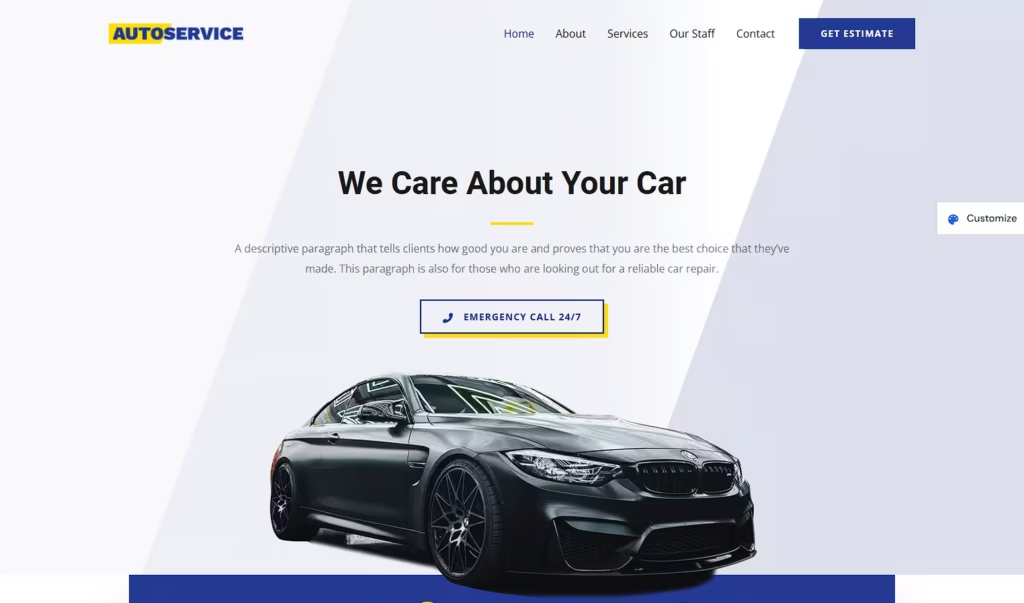
By choosing the blue pill 🟦, you prefer to keep the design provided by the template intact.
Capture decran 2024 11 25 133355

Header and Footer

Globally configured, they will remain identical across all your pages. If you want variations or pages without these elements, this method does not offer those options.

Colors and Global Styles

The template’s styles may not match your branding. Harmonize them to achieve a cohesive site that aligns with your vision.

Visual and Textual Content

The default logo and placeholder text should be replaced with your own content to reflect your identity. These changes will personalize the template for your project.

Block and Section Organization

The proposed template includes a predefined layout for blocks (text, images, buttons). If certain elements don’t fit your needs, feel free to remove or rearrange them to better suit your content structure.


What If You Change Your Mind?

Simplicity is quick, but it has its limits: fixed headers and footers, less freedom to customize every detail.

If you want more flexibility, it’s still time to choose the red pill and unleash your creativity.


Why Was Your Template Not Identical?

The page templates 📚 you imported come from Spectra, an extension integrated into WPDistrib. Spectra provides a library of pre-designed templates, both free and premium, tailored for beginners.

For these templates to appear ✨exactly as expected, they require a theme developed by the same editor: Astra. Known for its speed and compatibility with Spectra, Astra is one of the most popular themes worldwide. However, Astra is not pre-installed in WPDistrib.

💡 Did You Know? WPDistrib is based on WordPress’s native theme, a deliberate choice. With some practice, this theme can outperform most existing themes and stands on its own.

Solution: Install the Astra Theme

1. Go to your WordPress dashboard and navigate to Appearance > Themes.


2. Search for the Astra theme in the repository and click Install, then Activate.


3. Return to your page, and you’ll notice that the design now matches the imported template perfectly.


Your Turn!

You’ve chosen simplicity 🟦— now it’s time to customize your site. Install the Astra theme to showcase your template in all its glory. Once completed, return here and select one of the two options below:

💡 Did this article speak to you, make you think, or make you want to go further?

You might be wondering:

  • Can I create a website that reflects who I am, without relying on a closed tool?
  • Can I learn to publish, structure, and organize my content myself?
  • Am I ready to dedicate time to it?

If the answer is yes, then you’re in the right place.

Creating a useful and sustainable website does take some time — but it’s time well invested, to learn how to do things with clarity and method.

That’s exactly the goal of WPDistrib:

save time right from the start,
→ with an already optimized WordPress,
→ and free resources to learn how to use it well.


  • 👉 Want to start with an enhanced, lightweight, already optimized WordPress? I download WPDistrib
  • Prefer to learn and understand before you dive in?👉 I explore the documentation base
  • 👉 Want to go further and structure a site around a profession or a passion? I discover the method
Install Astra with WPDistrib for an Optimized and Structured WordPress Design.
🟡 Iteration 2 —
Tagged version

🏷 This article has been tagged: it now has all the basic technical elements to be properly interpreted by search engines.

This includes SEO metadata (title, description, excerpt), a featured image, and a consistent internal linking structure.

📌 This step is not yet a complete SEO optimization, but it allows the article to be shared properly on social media.
Thanks to its image, title, and excerpt, it’s ready to circulate in a content distribution logic.

Install Astra with WPDistrib for a Design Perfectly Aligned with Your Spectra Templates. Follow this guide for a quick installation and an accurate rendering of your imported template.

Beginning of the article

Install Astra with WPDistrib for Your Spectra Templates

You’ve opted for a quick and practical solution to create your website. This choice allows you to establish a solid foundation rapidly but requires a few adjustments to perfectly align with your project.

By choosing the blue pill 🟦, you prefer to keep the design provided by the template intact.

Capture decran 2024 11 25 133355

Header and Footer

Globally configured, they will remain identical across all your pages. If you want variations or pages without these elements, this method does not offer those options.

Colors and Global Styles

The template’s styles may not match your branding. Harmonize them to achieve a cohesive site that aligns with your vision.

Visual and Textual Content

The default logo and placeholder text should be replaced with your own content to reflect your identity. These changes will personalize the template for your project.

Block and Section Organization

The proposed template includes a predefined layout for blocks (text, images, buttons). If certain elements don’t fit your needs, feel free to remove or rearrange them to better suit your content structure.


What If You Change Your Mind?

Simplicity is quick, but it has its limits: fixed headers and footers, less freedom to customize every detail.

If you want more flexibility, it’s still time to choose the red pill and unleash your creativity.


Why Was Your Template Not Identical?

The page templates 📚 you imported come from Spectra, an extension integrated into WPDistrib. Spectra provides a library of pre-designed templates, both free and premium, tailored for beginners.

For these templates to appear ✨exactly as expected, they require a theme developed by the same editor: Astra. Known for its speed and compatibility with Spectra, Astra is one of the most popular themes worldwide. However, Astra is not pre-installed in WPDistrib.

💡 Did You Know? WPDistrib is based on WordPress’s native theme, a deliberate choice. With some practice, this theme can outperform most existing themes and stands on its own.

Solution: Install the Astra Theme

1. Go to your WordPress dashboard and navigate to Appearance > Themes.


2. Search for the Astra theme in the repository and click Install, then Activate.


3. Return to your page, and you’ll notice that the design now matches the imported template perfectly.


Your Turn!

You’ve chosen simplicity 🟦— now it’s time to customize your site. Install the Astra theme to showcase your template in all its glory. Once completed, return here and select one of the two options below:

End of the article

💡 Did this article speak to you, make you think, or make you want to go further?

You might be wondering:

  • Can I create a website that reflects who I am, without relying on a closed tool?
  • Can I learn to publish, structure, and organize my content myself?
  • Am I ready to dedicate time to it?

If the answer is yes, then you’re in the right place.

Creating a useful and sustainable website does take some time — but it’s time well invested, to learn how to do things with clarity and method.

That’s exactly the goal of WPDistrib:

save time right from the start,
→ with an already optimized WordPress,
→ and free resources to learn how to use it well.


  • 👉 Want to start with an enhanced, lightweight, already optimized WordPress? I download WPDistrib
  • Prefer to learn and understand before you dive in?👉 I explore the documentation base
  • 👉 Want to go further and structure a site around a profession or a passion? I discover the method