

?

Bienvenue sur une fiche “article documentaire”
Cette page présente un contenu structuré, pensé pour t’apporter une vraie plus-value à la lecture.
Faisons le tour ensemble !

Ici s’affiche le sujet traité dans l’article.
Il joue le rôle de titre principal, clair, orienté “bénéfice utilisateur”.
➜ L’objectif est que tu saches immédiatement si cet article répond à ton besoin.

Cette zone indique qui est à l’origine de l’article.
Cela permet de contextualiser le contenu : qui parle, d’où, avec quelle expérience ?

Ici sont listées les catégories documentaires associées à l’article.
➜ Elles t’aident à comprendre dans quel contexte s’inscrit le contenu, et à retrouver d’autres ressources liées.

Ce badge indique le niveau de maturité de l’article.
➜ C’est une information précieuse pour juger de la maturité du contenu.

Cette illustration visuelle accompagne l’article.
➜ Elle est utilisée pour donner un repère rapide au lecteur, ou illustrer une tendance, une dynamique, un sujet.

Ce texte présente la plus-value de la lecture :
➜ Pourquoi cet article vaut la peine d’être lu ?
➜ Qu’est-ce que tu vas en retirer ?
C’est techniquement “l’extrait” de l’article.

Ce bouton te permet de commencer la lecture de l’article complet.
Tu as vu le contexte, les bénéfices, les thématiques…
➜ Il est temps de plonger dans le contenu

Tu connais maintenant la structure d’une fiche article documentaire sur WPDistrib !
Bonne lecture!
Tu peux relancer ce tutoriel à tout moment via le bouton “?” en bas à droite.

❓Topic covered in this documentation article:

🧐 WPDistrib Review of White Label CMS 🟢 Included

🟡 Iteration 2 —
Tagged version

🏷 This article has been tagged: it now has all the basic technical elements to be properly interpreted by search engines.

This includes SEO metadata (title, description, excerpt), a featured image, and a consistent internal linking structure.

📌 This step is not yet a complete SEO optimization, but it allows the article to be shared properly on social media.
Thanks to its image, title, and excerpt, it’s ready to circulate in a content distribution logic.

Customizable WordPress admin interface with tools, illustrating the WPDistrib review of White Label CMS.

White Label CMS customizes the WordPress admin interface to deliver white-labeled websites. A default plugin included in WPDistrib.

White Label CMS is an essential plugin, included in WPDistrib to customize the WordPress admin interface and offer a tailored experience to each user. WPDistrib leverages this plugin to provide a dashboard customized with the distribution’s branding, while allowing users to easily reconfigure it to meet their own or their clients’ needs. Here’s how White Label CMS fits perfectly into WPDistrib’s approach.


Understand why White Label CMS is integrated into WPDistrib

The integration of White Label CMS reflects WPDistrib’s mission to deliver an optimized, ready-to-use WordPress environment. This plugin allows WPDistrib to offer a customized and more accessible admin interface, especially for users new to WordPress. By adding visual and educational elements right from the first login, WPDistrib ensures a quick and structured onboarding process.

Customize the WordPress admin with White Label CMS

With White Label CMS, WPDistrib transforms the classic WordPress interface into a unique and professional experience:

✅ Custom login screen featuring the WPDistrib logo and personalized messages.

✅ Optimized dashboard: simplified menus, welcome messages, and removal of unnecessary elements.

✅ Built-in WPDistrib guides and reminders to assist users from the start.

This plugin helps users adopt best practices while creating a tailored admin environment within WPDistrib.

Understanding the white-label concept with White Label CMS

White-label definition:

The white-label concept allows you to use an existing product (such as WPDistrib and its tools) while customizing it to match the branding of an agency or a client. The goal is to deliver a WordPress site where no WPDistrib logo or mention appears, leaving room for fully personalized branding.

💡 With White Label CMS, this approach includes:

  • Replacing WPDistrib logos with your company’s or your client’s branding.
  • Customizing messages and colors in the admin interface.
  • Delivering turnkey projects fully reflecting your or your client’s brand.

👉 This method is ideal for professionals looking to provide their clients with a fully customized WordPress solution, free from third-party mentions.

Facilitate beginner onboarding with WPDistrib support

White Label CMS is also a key onboarding tool within WPDistrib. The plugin adds to the dashboard:

🚀 Help messages and notifications to guide users post-installation.

🚀 Direct links to WPDistrib resources and recommendations for getting started.

🚀 Regular reminders of best practices for content creation and management.

Thanks to these features, WPDistrib enhances the onboarding experience, especially for beginners.
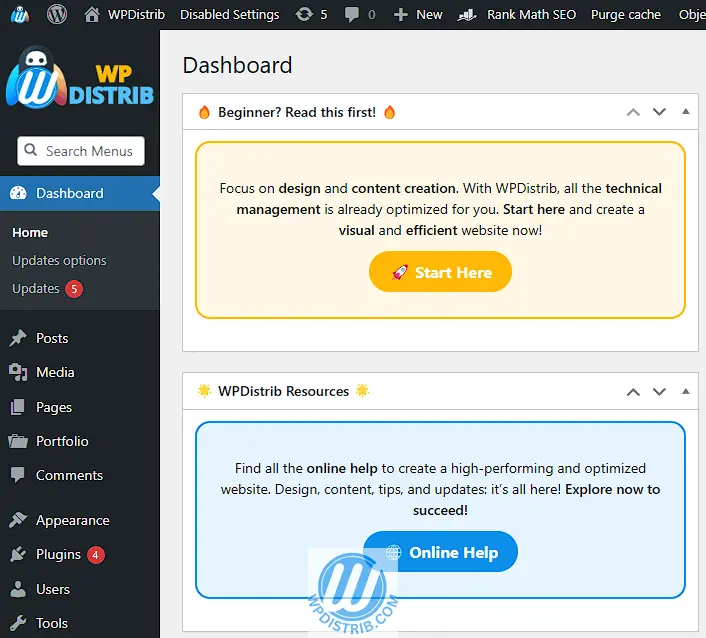
Wpdistrib White Label

Respect WPDistrib’s open-source philosophy and best practices

WPDistrib is open source and free to use, whether for personal or professional projects. However:

💡 If you keep the WPDistrib logo within the customized admin via White Label CMS, you must credit WPDistrib’s authorship.

💡 You are free to replace all WPDistrib elements with your own or your client’s branding.

💡 All customizations are possible without modifying a single line of code, thanks to White Label CMS’s intuitive interface.

🌀 White Label CMS: an included and recommended tool by WPDistrib

White Label CMS is fully integrated into WPDistrib to simplify WordPress customization from the moment of installation. The plugin helps users configure their working environment and freely adapt it to their own projects or client needs.

✅ A powerful tool, included by default in WPDistrib, and fully aligned with professional best practices for managing and customizing WordPress.

💡 Did this article speak to you, make you think, or make you want to go further?

You might be wondering:

  • Can I create a website that reflects who I am, without relying on a closed tool?
  • Can I learn to publish, structure, and organize my content myself?
  • Am I ready to dedicate time to it?

If the answer is yes, then you’re in the right place.

Creating a useful and sustainable website does take some time — but it’s time well invested, to learn how to do things with clarity and method.

That’s exactly the goal of WPDistrib:

save time right from the start,
→ with an already optimized WordPress,
→ and free resources to learn how to use it well.


  • 👉 Want to start with an enhanced, lightweight, already optimized WordPress? I download WPDistrib
  • Prefer to learn and understand before you dive in?👉 I explore the documentation base
  • 👉 Want to go further and structure a site around a profession or a passion? I discover the method
Customizable WordPress admin interface with tools, illustrating the WPDistrib review of White Label CMS.
🟡 Iteration 2 —
Tagged version

🏷 This article has been tagged: it now has all the basic technical elements to be properly interpreted by search engines.

This includes SEO metadata (title, description, excerpt), a featured image, and a consistent internal linking structure.

📌 This step is not yet a complete SEO optimization, but it allows the article to be shared properly on social media.
Thanks to its image, title, and excerpt, it’s ready to circulate in a content distribution logic.

, , , ,

White Label CMS customizes the WordPress admin interface to deliver white-labeled websites. A default plugin included in WPDistrib.

Beginning of the article

White Label CMS is an essential plugin, included in WPDistrib to customize the WordPress admin interface and offer a tailored experience to each user. WPDistrib leverages this plugin to provide a dashboard customized with the distribution’s branding, while allowing users to easily reconfigure it to meet their own or their clients’ needs. Here’s how White Label CMS fits perfectly into WPDistrib’s approach.


Understand why White Label CMS is integrated into WPDistrib

The integration of White Label CMS reflects WPDistrib’s mission to deliver an optimized, ready-to-use WordPress environment. This plugin allows WPDistrib to offer a customized and more accessible admin interface, especially for users new to WordPress. By adding visual and educational elements right from the first login, WPDistrib ensures a quick and structured onboarding process.

Customize the WordPress admin with White Label CMS

With White Label CMS, WPDistrib transforms the classic WordPress interface into a unique and professional experience:

✅ Custom login screen featuring the WPDistrib logo and personalized messages.

✅ Optimized dashboard: simplified menus, welcome messages, and removal of unnecessary elements.

✅ Built-in WPDistrib guides and reminders to assist users from the start.

This plugin helps users adopt best practices while creating a tailored admin environment within WPDistrib.

Understanding the white-label concept with White Label CMS

White-label definition:

The white-label concept allows you to use an existing product (such as WPDistrib and its tools) while customizing it to match the branding of an agency or a client. The goal is to deliver a WordPress site where no WPDistrib logo or mention appears, leaving room for fully personalized branding.

💡 With White Label CMS, this approach includes:

  • Replacing WPDistrib logos with your company’s or your client’s branding.
  • Customizing messages and colors in the admin interface.
  • Delivering turnkey projects fully reflecting your or your client’s brand.

👉 This method is ideal for professionals looking to provide their clients with a fully customized WordPress solution, free from third-party mentions.

Facilitate beginner onboarding with WPDistrib support

White Label CMS is also a key onboarding tool within WPDistrib. The plugin adds to the dashboard:

🚀 Help messages and notifications to guide users post-installation.

🚀 Direct links to WPDistrib resources and recommendations for getting started.

🚀 Regular reminders of best practices for content creation and management.

Thanks to these features, WPDistrib enhances the onboarding experience, especially for beginners.

Wpdistrib White Label

Respect WPDistrib’s open-source philosophy and best practices

WPDistrib is open source and free to use, whether for personal or professional projects. However:

💡 If you keep the WPDistrib logo within the customized admin via White Label CMS, you must credit WPDistrib’s authorship.

💡 You are free to replace all WPDistrib elements with your own or your client’s branding.

💡 All customizations are possible without modifying a single line of code, thanks to White Label CMS’s intuitive interface.

🌀 White Label CMS: an included and recommended tool by WPDistrib

White Label CMS is fully integrated into WPDistrib to simplify WordPress customization from the moment of installation. The plugin helps users configure their working environment and freely adapt it to their own projects or client needs.

✅ A powerful tool, included by default in WPDistrib, and fully aligned with professional best practices for managing and customizing WordPress.

End of the article

💡 Did this article speak to you, make you think, or make you want to go further?

You might be wondering:

  • Can I create a website that reflects who I am, without relying on a closed tool?
  • Can I learn to publish, structure, and organize my content myself?
  • Am I ready to dedicate time to it?

If the answer is yes, then you’re in the right place.

Creating a useful and sustainable website does take some time — but it’s time well invested, to learn how to do things with clarity and method.

That’s exactly the goal of WPDistrib:

save time right from the start,
→ with an already optimized WordPress,
→ and free resources to learn how to use it well.


  • 👉 Want to start with an enhanced, lightweight, already optimized WordPress? I download WPDistrib
  • Prefer to learn and understand before you dive in?👉 I explore the documentation base
  • 👉 Want to go further and structure a site around a profession or a passion? I discover the method