

?

Bienvenue sur une fiche “article documentaire”
Cette page présente un contenu structuré, pensé pour t’apporter une vraie plus-value à la lecture.
Faisons le tour ensemble !

Ici s’affiche le sujet traité dans l’article.
Il joue le rôle de titre principal, clair, orienté “bénéfice utilisateur”.
➜ L’objectif est que tu saches immédiatement si cet article répond à ton besoin.

Cette zone indique qui est à l’origine de l’article.
Cela permet de contextualiser le contenu : qui parle, d’où, avec quelle expérience ?

Ici sont listées les catégories documentaires associées à l’article.
➜ Elles t’aident à comprendre dans quel contexte s’inscrit le contenu, et à retrouver d’autres ressources liées.

Ce badge indique le niveau de maturité de l’article.
➜ C’est une information précieuse pour juger de la maturité du contenu.

Cette illustration visuelle accompagne l’article.
➜ Elle est utilisée pour donner un repère rapide au lecteur, ou illustrer une tendance, une dynamique, un sujet.

Ce texte présente la plus-value de la lecture :
➜ Pourquoi cet article vaut la peine d’être lu ?
➜ Qu’est-ce que tu vas en retirer ?
C’est techniquement “l’extrait” de l’article.

Ce bouton te permet de commencer la lecture de l’article complet.
Tu as vu le contexte, les bénéfices, les thématiques…
➜ Il est temps de plonger dans le contenu

Tu connais maintenant la structure d’une fiche article documentaire sur WPDistrib !
Bonne lecture!
Tu peux relancer ce tutoriel à tout moment via le bouton “?” en bas à droite.

❓Topic covered in this documentation article:

#3 WPDistrib: An Ever More Optimized and Accessible Distribution

📚 Related topics in the documentation base:

🟡 Iteration 2 —
Tagged version

🏷 This article has been tagged: it now has all the basic technical elements to be properly interpreted by search engines.

This includes SEO metadata (title, description, excerpt), a featured image, and a consistent internal linking structure.

📌 This step is not yet a complete SEO optimization, but it allows the article to be shared properly on social media.
Thanks to its image, title, and excerpt, it’s ready to circulate in a content distribution logic.

WPDistrib: An Ever More Optimized and Accessible Distribution

WordPress 6.8 is approaching, and WPDistrib is getting ready for this new version with important adjustments! Two extensions are being removed, while others might be integrated… but which ones?

#3 WPDistrib: An Ever More Optimized and Accessible Distribution

📋 In this issue:

News:

  • WordPress 6.8 is coming in April: What to expect?
  • Preparation for WPDistrib 6.8, scheduled for May.

Expert topic:

  • How to get started with WPDistrib using the new detailed tutorials?

👉 At the end of the newsletter, an exclusive focus: Checking plugin compatibility with WordPress

📢 WPDistrib Preparation for WordPress 6.8

WordPress 6.8 is coming in April, and WPDistrib is adapting to stay optimized.

Two extensions will be removed:

🚫 GenerateBlocks: Once useful for overcoming Gutenberg’s limitations, this plugin is becoming obsolete with improvements to the native editor.

🚫 Code Profiler: Designed for performance analysis but not essential for daily use. Its removal lightens the distribution without affecting efficiency.

🔗 Learn more about these decisions

Vers Towards the Integration of New Extensions?de nouvelles extensions ?

This update could also be an opportunity to integrate new plugins, but only those that are useful for all types of WordPress projects. The goal is to offer a universal and optimized distribution, avoiding overly specialized tools like WooCommerce, which is exclusively for e-commerce sites.

💡 Your opinion matters!

If you believe an extension is essential for all types of projects (blogs, showcase sites, e-commerce, etc.), send your suggestions to contact@wpdistrib.com. Every proposal will be carefully reviewed to make WPDistrib even more efficient and better suited to users’ real needs.

Why Choose WPDistrib Over Standard WordPress?

The idea is simple in the long run:

  • ✅ No more starting from a blank WordPress installation—WPDistrib provides an optimized distribution with the best pre-configured extensions.
  • ✅ Take advantage of the latest innovations without wasting time testing and comparing plugins.
  • ✅ Start every project with a stable, high-performance foundation adaptable to any type of website.

WPDistrib evolves with every WordPress update and adjusts to the latest best practices. With WordPress 6.8 on the horizon, WPDistrib keeps pace to deliver an even smoother and more efficient experience.

📩 Ideas or suggestions? Write to contact@wpdistrib.com!🚀

📢 WPDistrib: Step-by-Step Tutorials to Get Started

Getting started with WordPress can seem complex, especially for beginners. WPDistrib offers a three-step guide to make the first steps with WordPress easier. Now, Step 1 includes a detailed tutorial with screenshots, and the following steps will be available soon.

Step 1: Transforming Your Site’s Design

A detailed guide with screenshots is now available. If you encounter difficulties, a “Still Stuck” button provides access to an even more detailed tutorial.

  • 📌 Illustrated explanations: Screenshots at each step help visualize the actions to take.
  • 📌 Faster than a video: All the information is accessible at a glance.

🔗 Check out the detailed tutorial

Steps 2 & 3 Coming Soon

The remaining tutorials will be available in the coming month to provide full guidance.

WPDistrib: More Than Just WordPress

WPDistrib goes beyond WordPress—it’s a complete ecosystem for content creation, integrating additional online tools beyond the CMS. The goal is to simplify web creation as a whole, relying exclusively on free solutions.

  • A structured framework to get started the right way
  • A 100% free approach—every recommended tool follows this philosophy
  • A broader vision—beyond WordPress, a comprehensive approach to digital creation

🔗 Explore the 🛟Docs section

📩 Have suggestions or specific needs? Your feedback is invaluable in enhancing WPDistrib’s resources! 🚀 Write to contact@wpdistrib.com

📢 WPDistrib: Download and Install in Just a Few Simple Steps!

WPDistrib is now available for download on SourceForge and can be installed with ease. This distribution provides an optimized, ready-to-use WordPress setup, eliminating the need to manually search for and configure each extension.

📥 Download WPDistrib 6.7.1 [SourceForge Link]

This version follows WordPress numbering and currently corresponds to WordPress 6.7.1.

  • 1️⃣ Install WordPress – A fresh WordPress environment is required before applying WPDistrib.
  • 2️⃣ Install the UpdraftPlus Plugin – This plugin allows you to restore a complete configuration in just a few clicks.
  • 3️⃣ Download and Prepare WPDistrib – Get the ZIP file from SourceForge, then extract the archive. Inside, you will find multiple zipped files.
  • 4️⃣ Import and Restore via UpdraftPlus – Upload all extracted zipped files into UpdraftPlus and start the full restoration process.
  • 5️⃣ Update WordPress and Plugins – After restoration, simply perform updates to get a fully optimized WordPress setup.

💡 No additional code is added.

WPDistrib is simply an automation of essential installations and configurations. It’s as if everything were manually set up, with no modifications to WordPress’ native code.

  • 100% free
  • Ethical and transparent
  • No surprises: an installation fully aligned with WordPress standards

🚀 WPDistrib 6.8 is coming soon

The next version, WPDistrib 6.8, is scheduled for May, alongside WordPress 6.8. This update will include the latest optimizations for an even smoother experience.

📩 Questions or feedback? Share your experience after installation! Write to contact@wpdistrib.com!

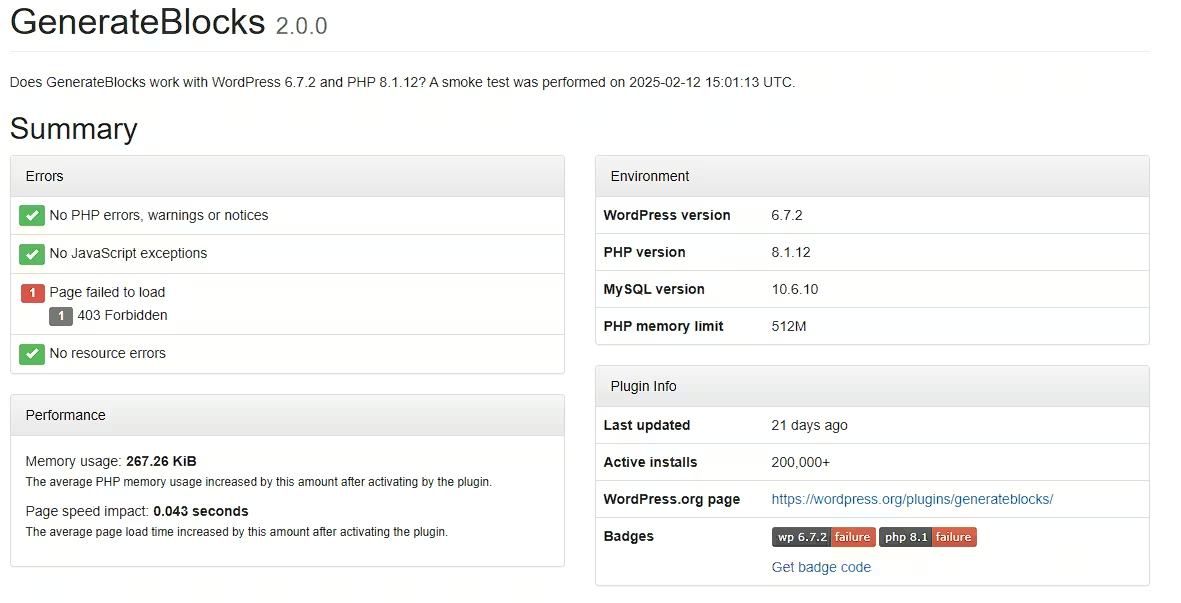
When a new WordPress version is released, it’s crucial to ensure that the plugins you use remain compatible and don’t cause major issues. To help with this, WPDistrib has recently launched a dedicated page highlighting a key tool:

📌 PluginTests.com
This website allows you to analyze plugin compatibility with the latest WordPress version. By leveraging its results and user feedback, you can easily identify reliable plugins and spot potential issues.

The integration of a plugin into WPDistrib is not done randomly. From now on, ensuring no major incompatibilities is a mandatory criterion before any inclusion. This marks the first step toward establishing a more rigorous set of guidelines to guarantee the stability and performance of the distribution.

💡 An evolving framework – These guidelines will continue to evolve with the goal of ensuring an increasingly reliable and optimized WordPress environment.

📩 Curious to learn more? Visit the dedicated page on WPDistrib to discover how to easily test your plugins before each major WordPress update. 🚀

🚀 WPDistrib Keeps Evolving!

With the release of WordPress 6.8, WPDistrib is adapting to provide an even more optimized and high-performance distribution. From the removal of obsolete plugins to the future integration of new tools and enriched tutorials for beginners, each update strengthens its mission: delivering a stable, fast, and ready-to-use WordPress foundation for all types of projects.

📥 Simplified download and installation – Now easier than ever with quick setup via UpdraftPlus and full transparency on the distribution’s contents. WPDistrib remains 100% free and ethical, ensuring an efficient WordPress configuration without proprietary code.

💡 Have a plugin suggestion? A question about installation? Your feedback is always welcome!

📩 Write to contact@wpdistrib.com and help improve WPDistrib.

🔜 See you in May for the release of WPDistrib 6.8! 🚀

💡 Did this article speak to you, make you think, or make you want to go further?

You might be wondering:

  • Can I create a website that reflects who I am, without relying on a closed tool?
  • Can I learn to publish, structure, and organize my content myself?
  • Am I ready to dedicate time to it?

If the answer is yes, then you’re in the right place.

Creating a useful and sustainable website does take some time — but it’s time well invested, to learn how to do things with clarity and method.

That’s exactly the goal of WPDistrib:

save time right from the start,
→ with an already optimized WordPress,
→ and free resources to learn how to use it well.


  • 👉 Want to start with an enhanced, lightweight, already optimized WordPress? I download WPDistrib
  • Prefer to learn and understand before you dive in?👉 I explore the documentation base
  • 👉 Want to go further and structure a site around a profession or a passion? I discover the method
WPDistrib: An Ever More Optimized and Accessible Distribution
🟡 Iteration 2 —
Tagged version

🏷 This article has been tagged: it now has all the basic technical elements to be properly interpreted by search engines.

This includes SEO metadata (title, description, excerpt), a featured image, and a consistent internal linking structure.

📌 This step is not yet a complete SEO optimization, but it allows the article to be shared properly on social media.
Thanks to its image, title, and excerpt, it’s ready to circulate in a content distribution logic.

WordPress 6.8 is approaching, and WPDistrib is getting ready for this new version with important adjustments! Two extensions are being removed, while others might be integrated… but which ones?

Beginning of the article

#3 WPDistrib: An Ever More Optimized and Accessible Distribution

📋 In this issue:

News:

  • WordPress 6.8 is coming in April: What to expect?
  • Preparation for WPDistrib 6.8, scheduled for May.

Expert topic:

  • How to get started with WPDistrib using the new detailed tutorials?

👉 At the end of the newsletter, an exclusive focus: Checking plugin compatibility with WordPress

📢 WPDistrib Preparation for WordPress 6.8

WordPress 6.8 is coming in April, and WPDistrib is adapting to stay optimized.

Two extensions will be removed:

🚫 GenerateBlocks: Once useful for overcoming Gutenberg’s limitations, this plugin is becoming obsolete with improvements to the native editor.

🚫 Code Profiler: Designed for performance analysis but not essential for daily use. Its removal lightens the distribution without affecting efficiency.

🔗 Learn more about these decisions

Vers Towards the Integration of New Extensions?de nouvelles extensions ?

This update could also be an opportunity to integrate new plugins, but only those that are useful for all types of WordPress projects. The goal is to offer a universal and optimized distribution, avoiding overly specialized tools like WooCommerce, which is exclusively for e-commerce sites.

💡 Your opinion matters!

If you believe an extension is essential for all types of projects (blogs, showcase sites, e-commerce, etc.), send your suggestions to contact@wpdistrib.com. Every proposal will be carefully reviewed to make WPDistrib even more efficient and better suited to users’ real needs.

Why Choose WPDistrib Over Standard WordPress?

The idea is simple in the long run:

  • ✅ No more starting from a blank WordPress installation—WPDistrib provides an optimized distribution with the best pre-configured extensions.
  • ✅ Take advantage of the latest innovations without wasting time testing and comparing plugins.
  • ✅ Start every project with a stable, high-performance foundation adaptable to any type of website.

WPDistrib evolves with every WordPress update and adjusts to the latest best practices. With WordPress 6.8 on the horizon, WPDistrib keeps pace to deliver an even smoother and more efficient experience.

📩 Ideas or suggestions? Write to contact@wpdistrib.com!🚀

📢 WPDistrib: Step-by-Step Tutorials to Get Started

Getting started with WordPress can seem complex, especially for beginners. WPDistrib offers a three-step guide to make the first steps with WordPress easier. Now, Step 1 includes a detailed tutorial with screenshots, and the following steps will be available soon.

Step 1: Transforming Your Site’s Design

A detailed guide with screenshots is now available. If you encounter difficulties, a “Still Stuck” button provides access to an even more detailed tutorial.

  • 📌 Illustrated explanations: Screenshots at each step help visualize the actions to take.
  • 📌 Faster than a video: All the information is accessible at a glance.

🔗 Check out the detailed tutorial

Steps 2 & 3 Coming Soon

The remaining tutorials will be available in the coming month to provide full guidance.

WPDistrib: More Than Just WordPress

WPDistrib goes beyond WordPress—it’s a complete ecosystem for content creation, integrating additional online tools beyond the CMS. The goal is to simplify web creation as a whole, relying exclusively on free solutions.

  • A structured framework to get started the right way
  • A 100% free approach—every recommended tool follows this philosophy
  • A broader vision—beyond WordPress, a comprehensive approach to digital creation

🔗 Explore the 🛟Docs section

📩 Have suggestions or specific needs? Your feedback is invaluable in enhancing WPDistrib’s resources! 🚀 Write to contact@wpdistrib.com

📢 WPDistrib: Download and Install in Just a Few Simple Steps!

WPDistrib is now available for download on SourceForge and can be installed with ease. This distribution provides an optimized, ready-to-use WordPress setup, eliminating the need to manually search for and configure each extension.

📥 Download WPDistrib 6.7.1 [SourceForge Link]

This version follows WordPress numbering and currently corresponds to WordPress 6.7.1.

  • 1️⃣ Install WordPress – A fresh WordPress environment is required before applying WPDistrib.
  • 2️⃣ Install the UpdraftPlus Plugin – This plugin allows you to restore a complete configuration in just a few clicks.
  • 3️⃣ Download and Prepare WPDistrib – Get the ZIP file from SourceForge, then extract the archive. Inside, you will find multiple zipped files.
  • 4️⃣ Import and Restore via UpdraftPlus – Upload all extracted zipped files into UpdraftPlus and start the full restoration process.
  • 5️⃣ Update WordPress and Plugins – After restoration, simply perform updates to get a fully optimized WordPress setup.

💡 No additional code is added.

WPDistrib is simply an automation of essential installations and configurations. It’s as if everything were manually set up, with no modifications to WordPress’ native code.

  • 100% free
  • Ethical and transparent
  • No surprises: an installation fully aligned with WordPress standards

🚀 WPDistrib 6.8 is coming soon

The next version, WPDistrib 6.8, is scheduled for May, alongside WordPress 6.8. This update will include the latest optimizations for an even smoother experience.

📩 Questions or feedback? Share your experience after installation! Write to contact@wpdistrib.com!

When a new WordPress version is released, it’s crucial to ensure that the plugins you use remain compatible and don’t cause major issues. To help with this, WPDistrib has recently launched a dedicated page highlighting a key tool:

📌 PluginTests.com
This website allows you to analyze plugin compatibility with the latest WordPress version. By leveraging its results and user feedback, you can easily identify reliable plugins and spot potential issues.

The integration of a plugin into WPDistrib is not done randomly. From now on, ensuring no major incompatibilities is a mandatory criterion before any inclusion. This marks the first step toward establishing a more rigorous set of guidelines to guarantee the stability and performance of the distribution.

💡 An evolving framework – These guidelines will continue to evolve with the goal of ensuring an increasingly reliable and optimized WordPress environment.

📩 Curious to learn more? Visit the dedicated page on WPDistrib to discover how to easily test your plugins before each major WordPress update. 🚀

🚀 WPDistrib Keeps Evolving!

With the release of WordPress 6.8, WPDistrib is adapting to provide an even more optimized and high-performance distribution. From the removal of obsolete plugins to the future integration of new tools and enriched tutorials for beginners, each update strengthens its mission: delivering a stable, fast, and ready-to-use WordPress foundation for all types of projects.

📥 Simplified download and installation – Now easier than ever with quick setup via UpdraftPlus and full transparency on the distribution’s contents. WPDistrib remains 100% free and ethical, ensuring an efficient WordPress configuration without proprietary code.

💡 Have a plugin suggestion? A question about installation? Your feedback is always welcome!

📩 Write to contact@wpdistrib.com and help improve WPDistrib.

🔜 See you in May for the release of WPDistrib 6.8! 🚀

End of the article

💡 Did this article speak to you, make you think, or make you want to go further?

You might be wondering:

  • Can I create a website that reflects who I am, without relying on a closed tool?
  • Can I learn to publish, structure, and organize my content myself?
  • Am I ready to dedicate time to it?

If the answer is yes, then you’re in the right place.

Creating a useful and sustainable website does take some time — but it’s time well invested, to learn how to do things with clarity and method.

That’s exactly the goal of WPDistrib:

save time right from the start,
→ with an already optimized WordPress,
→ and free resources to learn how to use it well.


  • 👉 Want to start with an enhanced, lightweight, already optimized WordPress? I download WPDistrib
  • Prefer to learn and understand before you dive in?👉 I explore the documentation base
  • 👉 Want to go further and structure a site around a profession or a passion? I discover the method