

?

Bienvenue sur une fiche “article documentaire”
Cette page présente un contenu structuré, pensé pour t’apporter une vraie plus-value à la lecture.
Faisons le tour ensemble !

Ici s’affiche le sujet traité dans l’article.
Il joue le rôle de titre principal, clair, orienté “bénéfice utilisateur”.
➜ L’objectif est que tu saches immédiatement si cet article répond à ton besoin.

Cette zone indique qui est à l’origine de l’article.
Cela permet de contextualiser le contenu : qui parle, d’où, avec quelle expérience ?

Ici sont listées les catégories documentaires associées à l’article.
➜ Elles t’aident à comprendre dans quel contexte s’inscrit le contenu, et à retrouver d’autres ressources liées.

Ce badge indique le niveau de maturité de l’article.
➜ C’est une information précieuse pour juger de la maturité du contenu.

Cette illustration visuelle accompagne l’article.
➜ Elle est utilisée pour donner un repère rapide au lecteur, ou illustrer une tendance, une dynamique, un sujet.

Ce texte présente la plus-value de la lecture :
➜ Pourquoi cet article vaut la peine d’être lu ?
➜ Qu’est-ce que tu vas en retirer ?
C’est techniquement “l’extrait” de l’article.

Ce bouton te permet de commencer la lecture de l’article complet.
Tu as vu le contexte, les bénéfices, les thématiques…
➜ Il est temps de plonger dans le contenu

Tu connais maintenant la structure d’une fiche article documentaire sur WPDistrib !
Bonne lecture!
Tu peux relancer ce tutoriel à tout moment via le bouton “?” en bas à droite.

❓Topic covered in this documentation article:

1. Transform Your Site with a Professional Design Instantly🎨

📚 Related topics in the documentation base:

🟡 Iteration 2 —
Tagged version

🏷 This article has been tagged: it now has all the basic technical elements to be properly interpreted by search engines.

This includes SEO metadata (title, description, excerpt), a featured image, and a consistent internal linking structure.

📌 This step is not yet a complete SEO optimization, but it allows the article to be shared properly on social media.
Thanks to its image, title, and excerpt, it’s ready to circulate in a content distribution logic.

Creating a Professional Design with WPDistrib and Spectra

Learn How to Quickly Transform Your WordPress Site Using Ready-to-Use Professional Designs. Discover how to create a page, choose a template, and customize your content easily with this step-by-step tutorial.

Transform Your Site with a Professional Design Instantly 🎨

Access ready-to-use designs to create an elegant and professional site in just a few clicks. Discover how to customize every detail, even without technical skills!

1️⃣ Create a New Page

Add a new page from your WordPress dashboard. Give it a clear and relevant name, such as Home, Services, or Contact.
💡 Tip: Repeat this process to create all the necessary pages for your site.

2️⃣ Choose a Suitable Design

Browse the design library under the “Kits” tab. Select a design that fits the type of page you want to create.
💡 Tip: Before finalizing, preview the design and think about how you can customize the text and images for a perfect result.

3️⃣ Customize Your Page

Edit the text, images, and colors to tailor the design to your needs.
💡 Tip: Duplicate, move, or delete blocks to structure your page as you wish and achieve a unique look.

Create a professional-looking website in just a few clicks!

Explore a selection of preconfigured and elegant visuals to style your site quickly, effortlessly, and without any technical skills.

Your Turn!

Create your pages in just a few clicks using these predefined visuals. Once you’re done, come back here and choose one of the two options below:

💡 Did this article speak to you, make you think, or make you want to go further?

You might be wondering:

  • Can I create a website that reflects who I am, without relying on a closed tool?
  • Can I learn to publish, structure, and organize my content myself?
  • Am I ready to dedicate time to it?

If the answer is yes, then you’re in the right place.

Creating a useful and sustainable website does take some time — but it’s time well invested, to learn how to do things with clarity and method.

That’s exactly the goal of WPDistrib:

save time right from the start,
→ with an already optimized WordPress,
→ and free resources to learn how to use it well.


  • 👉 Want to start with an enhanced, lightweight, already optimized WordPress? I download WPDistrib
  • Prefer to learn and understand before you dive in?👉 I explore the documentation base
  • 👉 Want to go further and structure a site around a profession or a passion? I discover the method
Creating a Professional Design with WPDistrib and Spectra
🟡 Iteration 2 —
Tagged version

🏷 This article has been tagged: it now has all the basic technical elements to be properly interpreted by search engines.

This includes SEO metadata (title, description, excerpt), a featured image, and a consistent internal linking structure.

📌 This step is not yet a complete SEO optimization, but it allows the article to be shared properly on social media.
Thanks to its image, title, and excerpt, it’s ready to circulate in a content distribution logic.

Learn How to Quickly Transform Your WordPress Site Using Ready-to-Use Professional Designs. Discover how to create a page, choose a template, and customize your content easily with this step-by-step tutorial.

Beginning of the article

Transform Your Site with a Professional Design Instantly 🎨

Access ready-to-use designs to create an elegant and professional site in just a few clicks. Discover how to customize every detail, even without technical skills!

1️⃣ Create a New Page

Add a new page from your WordPress dashboard. Give it a clear and relevant name, such as Home, Services, or Contact.
💡 Tip: Repeat this process to create all the necessary pages for your site.

2️⃣ Choose a Suitable Design

Browse the design library under the “Kits” tab. Select a design that fits the type of page you want to create.
💡 Tip: Before finalizing, preview the design and think about how you can customize the text and images for a perfect result.

3️⃣ Customize Your Page

Edit the text, images, and colors to tailor the design to your needs.
💡 Tip: Duplicate, move, or delete blocks to structure your page as you wish and achieve a unique look.

Create a professional-looking website in just a few clicks!

Explore a selection of preconfigured and elegant visuals to style your site quickly, effortlessly, and without any technical skills.
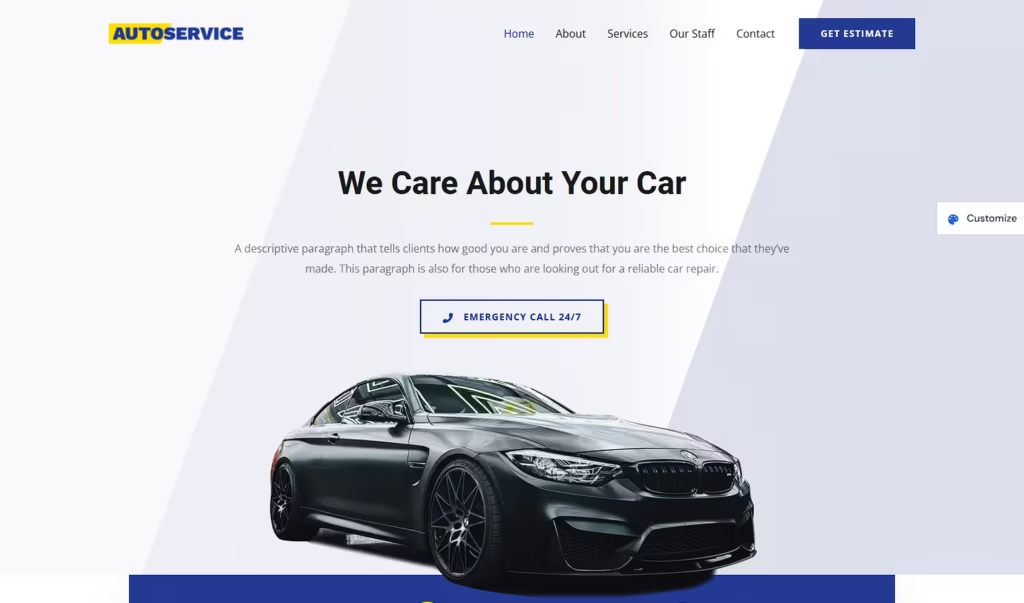
Your Turn!

Create your pages in just a few clicks using these predefined visuals. Once you’re done, come back here and choose one of the two options below:

End of the article

💡 Did this article speak to you, make you think, or make you want to go further?

You might be wondering:

  • Can I create a website that reflects who I am, without relying on a closed tool?
  • Can I learn to publish, structure, and organize my content myself?
  • Am I ready to dedicate time to it?

If the answer is yes, then you’re in the right place.

Creating a useful and sustainable website does take some time — but it’s time well invested, to learn how to do things with clarity and method.

That’s exactly the goal of WPDistrib:

save time right from the start,
→ with an already optimized WordPress,
→ and free resources to learn how to use it well.


  • 👉 Want to start with an enhanced, lightweight, already optimized WordPress? I download WPDistrib
  • Prefer to learn and understand before you dive in?👉 I explore the documentation base
  • 👉 Want to go further and structure a site around a profession or a passion? I discover the method